
New in Viewdora: Client Photo Gallery Defaults, Closing Dates, and Activity
Set client photo gallery defaults once, close galleries on a date you choose, let clients ask for more favorites, and see every view, favorite, and download.
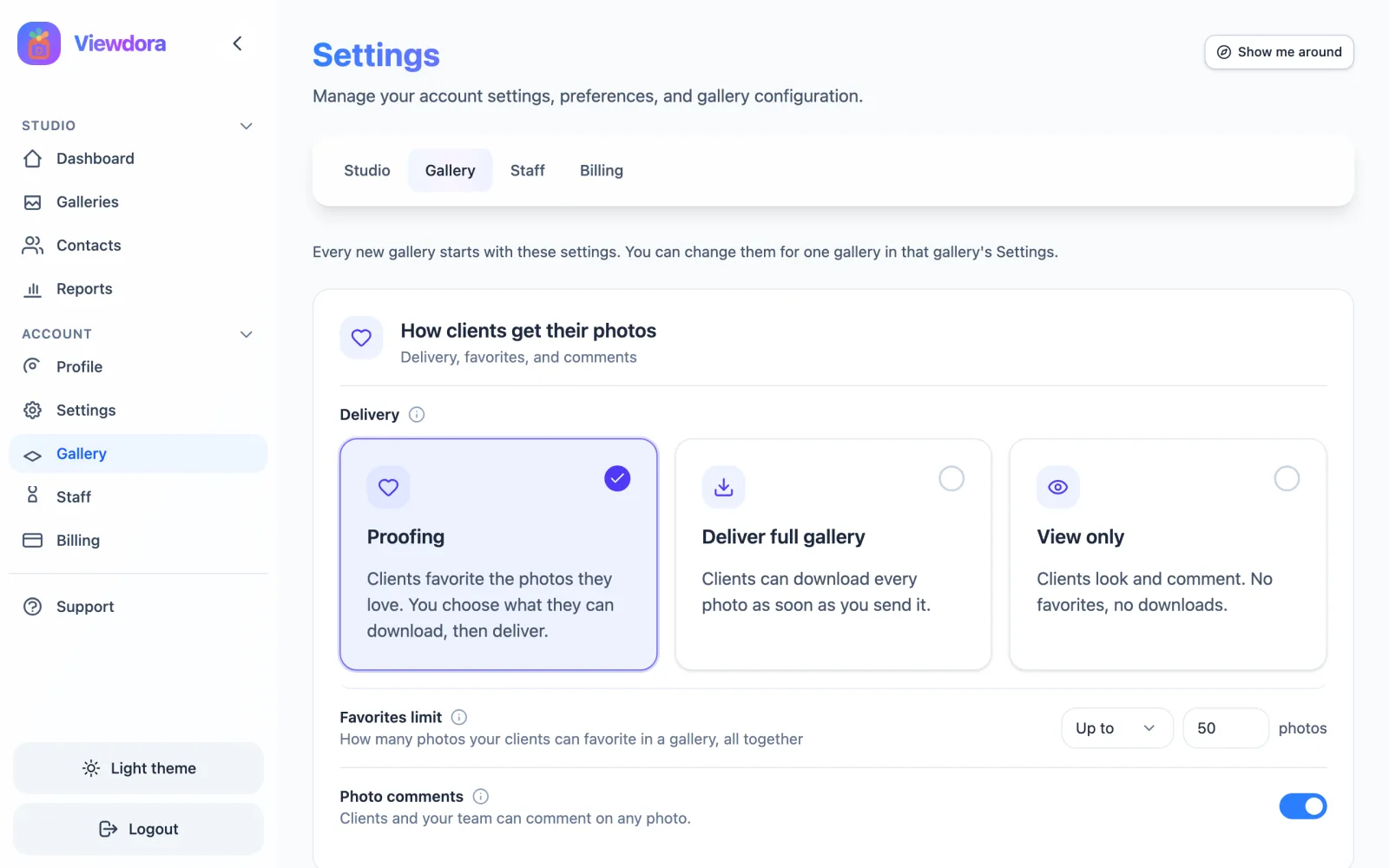
This is a big one, and we are really proud of it. The November 2, 2026 update gives your client photo gallery a lot more control with a lot less clicking.
You can now set your gallery settings once and have every new gallery start with them. Galleries can close on a date you choose, with reminder emails before they do. Clients who hit the favorites limit can ask you for more. And every gallery has a new Activity tab that shows what your clients viewed, favorited, and downloaded. There is also a new version of the client app, Turkish language support, and guided tours.
Here is everything that’s new, and how to use it.
What’s new at a glance
| Feature | What it does | Where to find it |
|---|---|---|
| Gallery defaults | Every new gallery starts with your delivery, favorites limit, closing date, comments, and watermark settings | Settings > Gallery |
| Closing dates | Closes a gallery 3 to 90 days after delivery, or never, with reminder emails first | Settings > Gallery, or a gallery’s Settings tab |
| Ask for more favorites | Clients at the limit can ask you to raise it | The gallery’s Overview |
| Activity | Shows views, favorites, downloads, devices, and screenshot tries for each client | The gallery’s Activity tab |
| Download order | Downloads follow the photo order clients see in the app | Automatic |
| Client app 2.8.4 | Favorites counter, comment threads, collections, pull to refresh | iOS and Android |
| Guided tours | Short tours of each page, only when you want them | “Show me around” on every page |
| Turkish | A new language for the studio, the client app, and emails | Profile, and each gallery |
Set your client photo gallery defaults once
Most studios deliver galleries the same way every time. Until now, that meant choosing the same settings again for each new gallery. Now you set them once, in Settings > Gallery, and every new gallery starts with them.
Your gallery defaults cover:
- Delivery. Proofing (clients favorite the photos they love, then you choose what they can download), Deliver full gallery (clients can download every photo as soon as you send it), or View only (clients look and comment, with no favorites or downloads).
- Favorites limit. How many photos your clients can favorite in a gallery. The limit counts all of a gallery’s clients together, so a couple sharing one gallery shares one limit.
- Closing date. When the gallery closes, and the reminder emails before it.
- Photo comments. On or off.
- Watermark. Added to the photos in your galleries.
Each gallery can still change its own settings. A gallery that is set differently from your defaults shows a small dot, so you can spot the exceptions at a glance.
How to set your gallery defaults
- Open Settings and choose the Gallery tab.
- Choose how clients usually get their photos: Proofing, Deliver full gallery, or View only.
- Set the favorites limit and turn photo comments on or off.
- Choose a closing date, what happens when a gallery closes, and when reminder emails go out.
- Set up your watermark, then save.
You can also do it while you work. When you create a gallery, you can skip straight to your studio defaults, or save that gallery’s settings as the defaults for next time.
How do client gallery closing dates work?
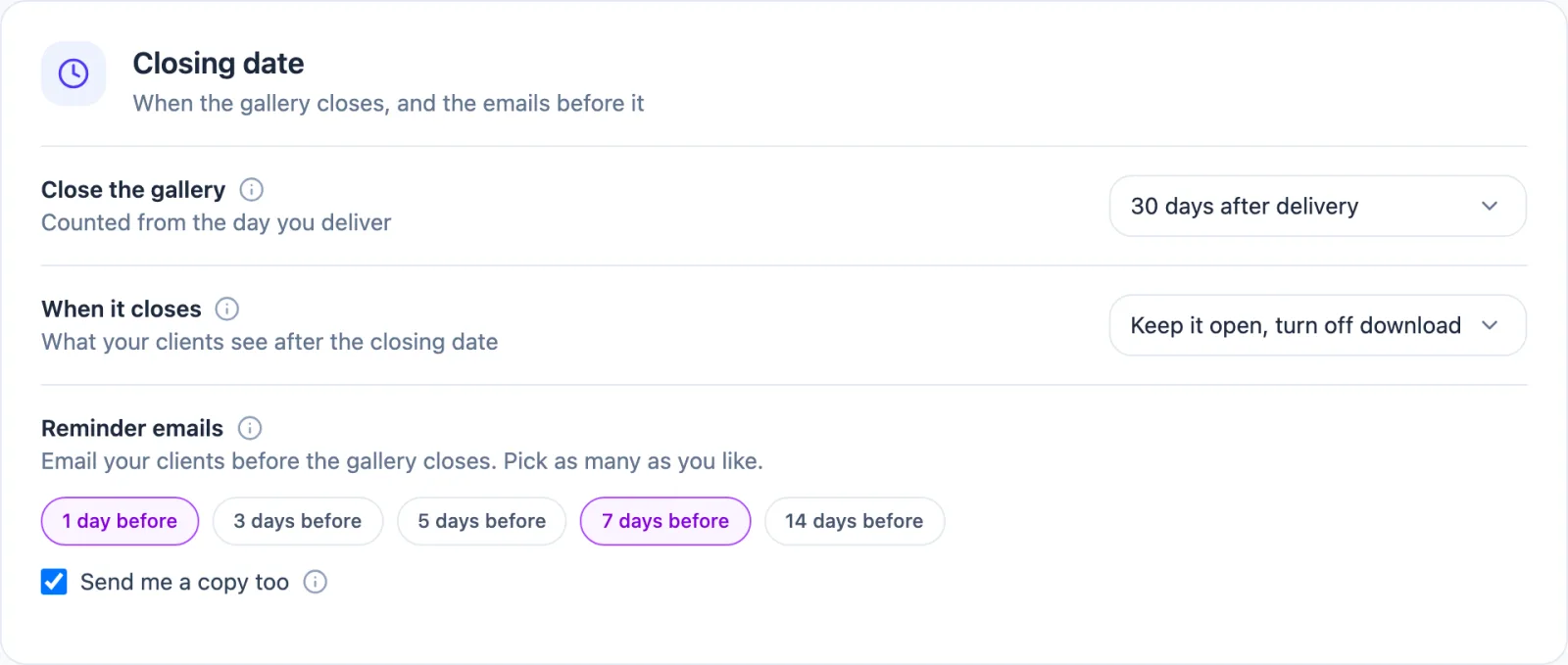
A closing date gives every delivery a clear end. You choose when a gallery closes: 3, 7, 14, 21, 30, 60, or 90 days after delivery, or never.
When the date arrives, Viewdora does what you chose:
- Hide the gallery. Clients can no longer open it.
- Turn off downloads. The gallery stays open to view, but downloads stop.
- Reminders only. Clients get the reminder emails, and the gallery stays open.
Reminder emails go to your clients before the gallery closes. You choose when (1, 3, 5, 7, or 14 days before, as many as you like), and you can get a copy yourself.
When you choose to hide a gallery, closing really means closed. Its photos stop loading right away, even from links a client saved earlier. When you turn off downloads instead, clients can still browse, but saved links to the full-size files stop working too.
Extend or reopen a gallery
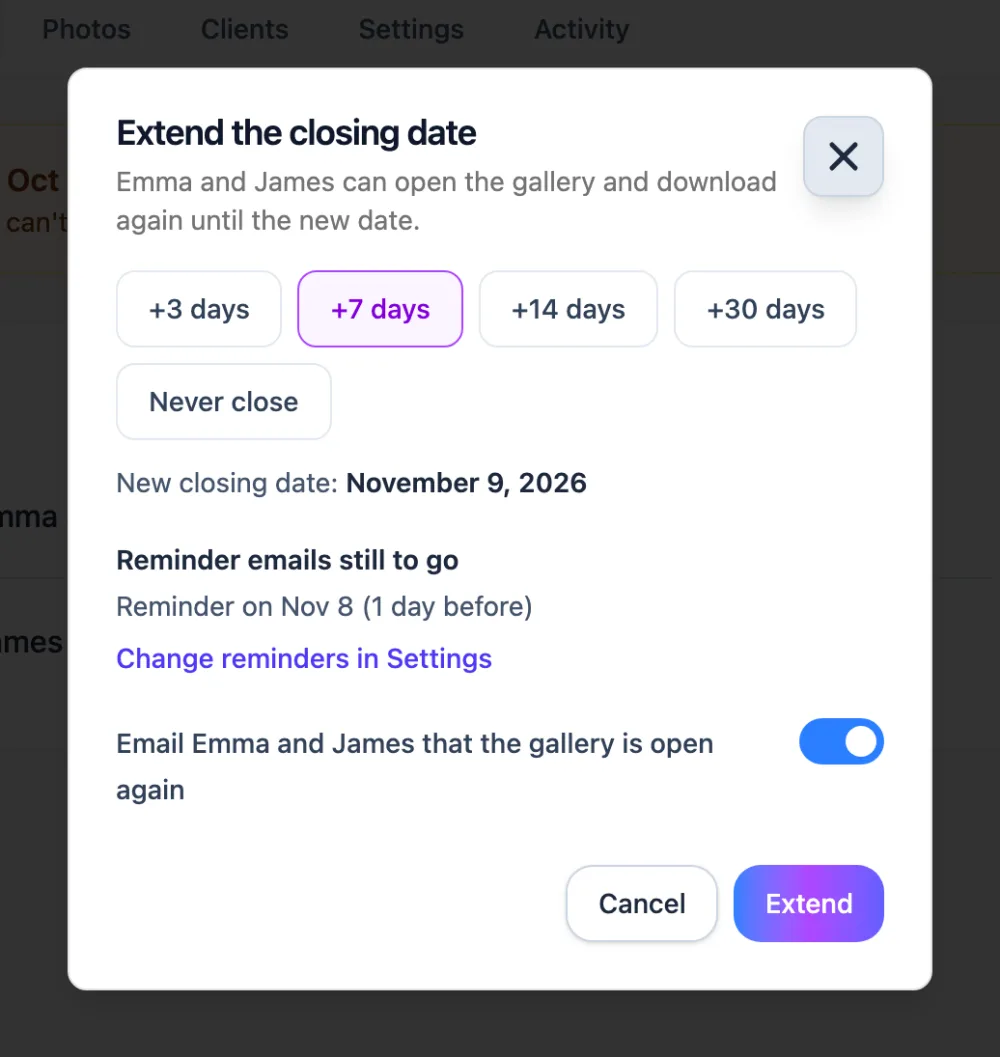
Clients ask for more time. That’s normal, and now it takes a few seconds. Open the gallery, choose Extend closing date, and add 3, 7, 14, or 30 days, or choose Never close. Your clients get a “Your gallery is open again” email, so you don’t have to write one.
Need to change something after delivery? Reopen a delivered gallery to add photos or change downloads, then deliver it again. Downloads pause while it’s reopened, so clients don’t download a half-finished set.
Closing dates build on the gallery expiration from our October update. They count from the day you deliver, and you can extend them right from the gallery.
What happens when a client hits the favorites limit?
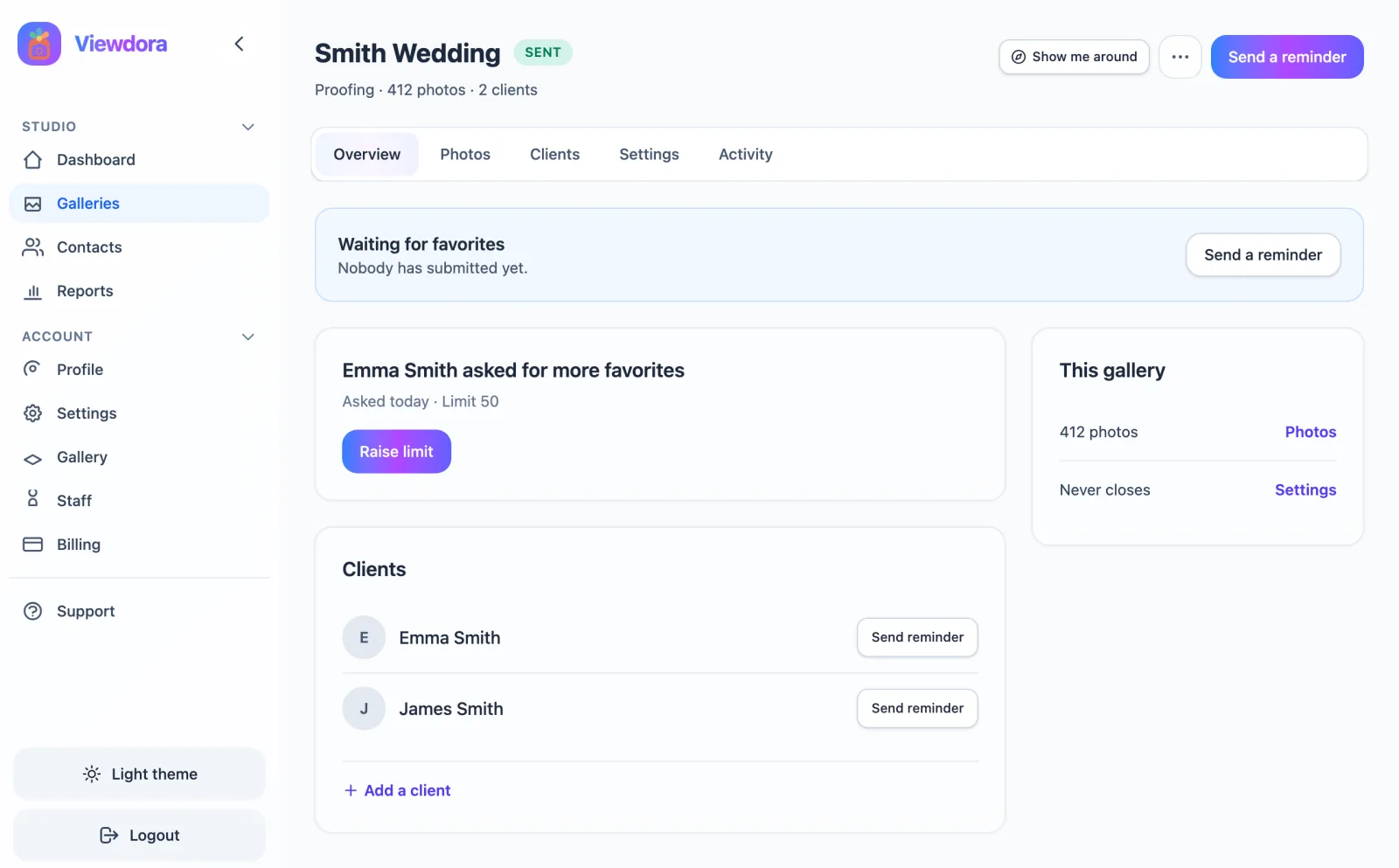
A favorites limit keeps proofing focused. But sometimes a client truly loves more photos than the limit allows. Now they can tell you.
When a client reaches the limit, they can ask you for more favorites, once a day per gallery. You get an email, and the gallery’s Overview shows who asked, with a Raise limit button. Raise it, and they can keep going.
Favorites a client has already sent stay locked, so the list you are working from doesn’t change under you. After sending, clients can still add more favorites one at a time.
New to proofing? Our secure photo delivery checklist walks through the whole review and delivery process.
See every view, favorite, and download in gallery activity
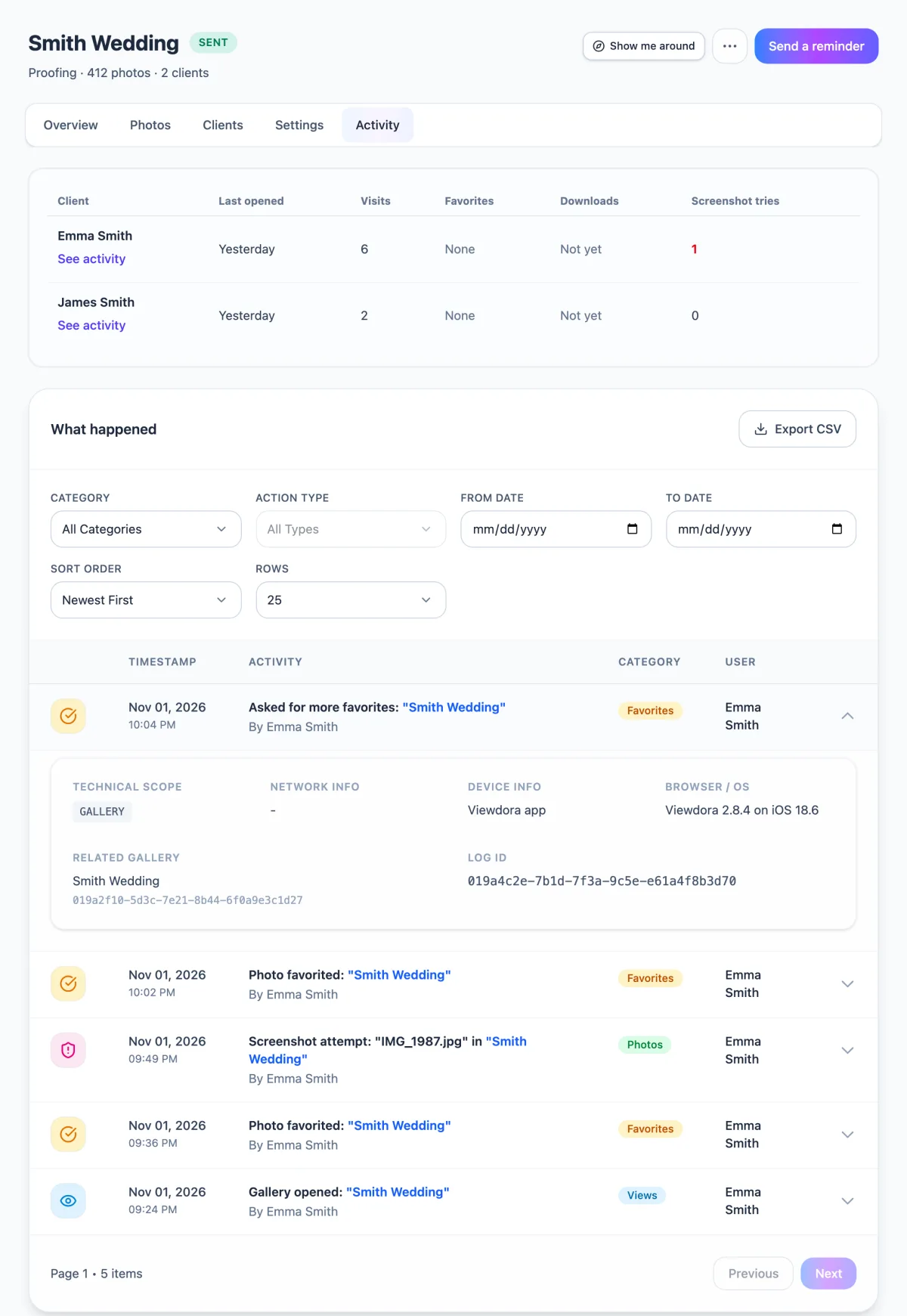
“Did they even open it?” Now you know. Every gallery has an Activity tab that shows what your clients did, sorted into Photos, Views, Favorites, and Downloads (plus Gallery and Clients).
Here is what you can see:
- One “Gallery opened” row per visit, so the list stays easy to read.
- The device, for example “Viewdora 2.8.4 on iOS”.
- Screenshot tries for each client, counted when the app blocks a screenshot. (Some older Android phones block the screenshot without counting it.)
- See activity for each client, which shows everything that one person did in the gallery.
- Export CSV, for your records or for a client who asks.
Downloads that follow your photo order
You spend time putting photos in the right order. Now downloads keep it. Downloaded photos follow the same order clients see in the app.
Each client also gets their own download link in the “photos ready” email, so nobody has to share or forward one.
A better client app on iOS and Android
Version 2.8.4 of the Viewdora client app is out for iOS and Android, and your clients will be asked to update. Here is what they get:
- A favorites counter that shows the gallery’s limit, and a way to ask for more favorites.
- Photo comment threads with unread badges, so replies are easy to spot.
- Delivered photos grouped by collection, each with its own Download button.
- Pull to refresh in the gallery.
- Clearer messages when a gallery is view only, closed, or reopened.
Screenshot protection works the same as before. Want the details on why phone apps can block screenshots and browsers can’t? Read Can clients screenshot your online gallery? or see how screenshot-protected galleries work.
Gallery email links open the app too. When a client taps a gallery link in an email, it opens the Viewdora app. Anyone who doesn’t have the app yet sees a page to download it.
Guided tours that stay out of your way
New to a page? Every page in the studio now has a Show me around button for a short tour.
Only two tours start on their own: the dashboard and “Create a gallery”. Each one is 5 steps or fewer. If you’d rather explore alone, choose Don’t show tours, or turn tours off with the switch in your Profile.
Turkish, better Spanish, and more
- Turkish is here. Turkish is now a language for the studio, the client app, and emails. In our language support post we said Turkish was the next language we were looking at. Now it’s live.
- Better Spanish. We improved Spanish across Viewdora.
- Your email choice. You choose whether you get Viewdora marketing emails, at signup and any time in your Profile.
- Small phones. Popups and the Staff page now fit small phone screens.
Frequently asked questions
Q: Can a client photo gallery close automatically?
A: Yes. Set a closing date of 3, 7, 14, 21, 30, 60, or 90 days after delivery, or choose never. When it closes, Viewdora hides the gallery, turns off downloads, or only sends reminders, depending on what you chose.
Q: Can I extend a gallery after it closes?
A: Yes. Choose Extend closing date on the gallery and add 3, 7, 14, or 30 days, or choose Never close. Your clients get an email that the gallery is open again.
Q: Does the favorites limit apply to each client or to the whole gallery?
A: The whole gallery. The limit counts all of a gallery’s clients together.
Q: What happens when a client reaches the favorites limit?
A: They can ask you for more favorites, once a day per gallery. You get an email and a card on the gallery’s Overview with a Raise limit button.
Q: Can I see if my client opened their gallery?
A: Yes. The gallery’s Activity tab shows each visit, plus favorites, downloads, the device used, and screenshot tries. You can also export it as a CSV file.
Q: Can one gallery use different settings from my defaults?
A: Yes. Change them in that gallery’s Settings tab. A small dot marks each setting that is different from your studio’s defaults.
Built for the way you deliver
We built this update around three everyday questions. How do I stop setting up every gallery from scratch? How do I close a gallery without chasing clients? Did they even look? Your client photo gallery now answers all three, and your clients get a better app too.
Open your studio and set your gallery defaults first. It takes a couple of minutes, and every gallery after that is faster. If you are new to Viewdora, start a 14-day free trial with full access to every plan and no credit card required.
Ready to protect your work?
Start your free trialRelated posts

New in Viewdora: Photo Comments, Billing, Gallery Expiration, and More
Explore the latest Viewdora features, including photo comment threads, in-app billing, automatic gallery expiration, improved watermark controls, and a smoother mobile experience.
Read more →
Event Photography Packages: What Photographers Should Include
Build event photography packages that clearly explain coverage, deliverables, pricing, image-use terms, and the final gallery experience.
Read more →
Language Support in Viewdora Galleries
Set the language for each Viewdora gallery and give Spanish-speaking clients a clear, seamless gallery experience in their language.
Read more →